これはなに

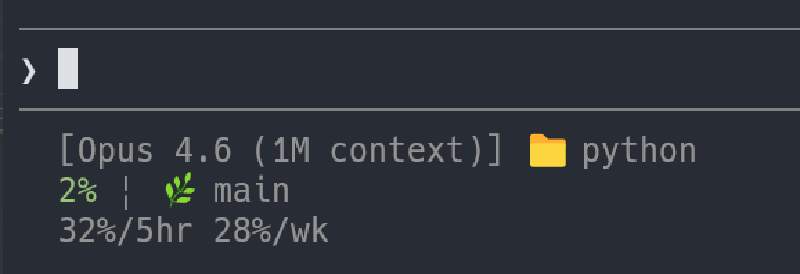
Claude Codeのステータスラインの設定を残しておくためのメモ。
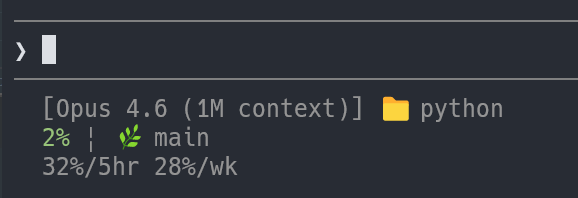
下記のようになる。
はじめに
諸事情により、ステータスラインのスクリプトはシェルスクリプトで書いている。ほんとうはPythonなどで書いたほうがグラデーションなど使えてよいかも。
前提条件
jqが使えること
ステータスラインの設定
- 下記を
~/.claude/statusline.shなどのファイルに保存する。
statusline.sh
#!/bin/bash
input=$(cat)

readonly CYAN='\033[0;36m'
readonly GREEN='\033[0;32m'
readonly YELLOW='\033[0;33m'
readonly RED='\033[0;31m'
readonly RESET='\033[0m'

readonly MODEL=$(echo "$input" | jq -r '.model.display_name')
readonly DIR=$(echo "$input" | jq -r '.workspace.current_dir')
# The "// 0" provides a fallback if the field is null
readonly PCT=$(echo "$input" | jq -r '.context_window.used_percentage // 0' | cut -d. -f1)
readonly HOUR_LIMIT=$(echo "$input" | jq -r '.rate_limits.five_hour.used_percentage // 0' | cut -d. -f1)
readonly WEEK_LIMIT=$(echo "$input" | jq -r '.rate_limits.seven_day.used_percentage // 0' | cut -d. -f1)


# ${DIR##*/} extracts just the folder name
echo "[${MODEL}] 📁 ${DIR##*/}"

if [ "${PCT}" -lt 40 ]; then
    PCT_COLOR=$GREEN
elif [ "${PCT}" -ge 80 ]; then
    PCT_COLOR=$RED
else
    PCT_COLOR=$YELLOW
fi

if git rev-parse --git-dir > /dev/null 2>&1; then
    readonly BRANCH=$(git branch --show-current 2>/dev/null)
    readonly STAGED=$(git diff --cached --numstat 2>/dev/null | wc -l | tr -d ' ')
    readonly MODIFIED=$(git diff --numstat 2>/dev/null | wc -l | tr -d ' ')

    GIT_STATUS=""
    [ "$STAGED" -gt 0 ] && GIT_STATUS="${GREEN}+${STAGED}${RESET}"
    [ "$MODIFIED" -gt 0 ] && GIT_STATUS="${GIT_STATUS}${YELLOW}~${MODIFIED}${RESET}"

    echo -e "${PCT_COLOR}${PCT}%${RESET} | 🌿 ${BRANCH} ${GIT_STATUS}"
else
    echo -e "${PCT_COLOR}${PCT}%${RESET}"
fi

echo -e "${HOUR_LIMIT}%/5hr ${WEEK_LIMIT}%/wk"- 実行権限を付与する
chmod +x ~/.claude/statusline.sh- Claude Codeの設定で、ステータスラインのコマンドに上記のファイルを指定する
Windowsの場合は次のようにする。
~/.claude/settings.json
{
  "statusLine": {
    "type": "command",
    "command": "bash -c \"~/.claude/statusline.sh\""
  },
}
Linux, WSLの場合は以下のようにする。
~/.claude/settings.json
{
  "statusLine": {
    "type": "command",
    "command": "~/.claude/statusline.sh"
  },
}