
これはなに

Expoで作成したアプリをAndroid 16へ対応させるためにやったことをまとめた記録。最終的に対応は完了した。
とった手順
1. Expo SDKのバージョンを確認する
Expo SDKのバージョンを確認する。これはpackage.jsonのdependenciesに記載されている。
{
  "dependencies": {
    "expo": "~53.0.17",
    ...
  }
}
Expo 53以下ならSDKを上げる必要がある。Expo 54以上ならSDKを上げる必要はない。 今回はExpo 53なのでSDKを上げる必要がある。
2. Expo SDKのバージョンを上げる
Expo SDKのバージョンを上げる。上げるときは1バージョンずつ上げることが公式で推奨されている。引用すると下記のように書かれている。
We recommend upgrading SDK versions incrementally, one at a time. Doing so will help you pinpoint breakages and issues that arise during the upgrade process.
また、Android 16に対応するだけなら、Expo SDK 54以上にすれば最低限問題ない。 よって、Expo SDKを53から54に上げることだけを目的として、下記のコマンドを実行する。
npm install expo@^54.0.0Expo SDK 54に上げたときのログ
$ npm install expo@^54.0.0
npm warn deprecated glob@7.2.3: Old versions of glob are not supported, and contain widely publicized security vulnerabilities, which have been fixed in the current version. Please update. Support for old versions may be purchased (at exorbitant rates) by contacting i@izs.me

added 108 packages, removed 39 packages, changed 105 packages, and audited 1713 packages in 52s

246 packages are looking for funding
  run `npm fund` for details

51 vulnerabilities (4 low, 17 moderate, 25 high, 5 critical)

To address issues that do not require attention, run:
  npm audit fix

To address all issues (including breaking changes), run:
  npm audit fix --force

Run `npm audit` for details.
npm warn allow-scripts 2 packages have install scripts not yet covered by allowScripts:
npm warn allow-scripts   protobufjs@7.5.3 (postinstall: node scripts/postinstall)
npm warn allow-scripts   unrs-resolver@1.10.1 (postinstall: napi-postinstall unrs-resolver 1.10.1 check)
npm warn allow-scripts
npm warn allow-scripts Run `npm approve-scripts --allow-scripts-pending` to review, or `npm approve-scripts <pkg>` to allow.インストール時にnpm ERR!となっていなければインストールは成功している。確認したい場合は下記で確認できる。
npm ls expoexpo@54.x.xのように表示されればインストールは成功している。
SDKをアップグレードしたら、expo install --fixとexpo-doctorの実行が公式で推奨されている。よって、これらも素直に実行する。
npx expo install --fix当時のログ
$ npx expo install --fix
env: load .env
env: export EXPO_PUBLIC_GOOGLE_WEB_CLIENT_ID
The following packages should be updated for best compatibility with the installed expo version:
  @expo/vector-icons@14.1.0 - expected version: ^15.0.3
  expo-blur@14.1.5 - expected version: ~15.0.8
  expo-constants@17.1.7 - expected version: ~18.0.13
  expo-dev-client@5.2.4 - expected version: ~6.0.21
  expo-font@13.3.2 - expected version: ~14.0.12
  expo-haptics@14.1.4 - expected version: ~15.0.8
  expo-linking@7.1.7 - expected version: ~8.0.12
  expo-router@5.1.3 - expected version: ~6.0.24
  expo-splash-screen@0.30.10 - expected version: ~31.0.13
  expo-status-bar@2.2.3 - expected version: ~3.0.9
  expo-symbols@0.4.5 - expected version: ~1.0.8
  expo-system-ui@5.0.10 - expected version: ~6.0.9
  expo-web-browser@14.2.0 - expected version: ~15.0.11
  react@19.0.0 - expected version: 19.1.0
  react-dom@19.0.0 - expected version: 19.1.0
  react-native@0.79.5 - expected version: 0.81.5
  react-native-gesture-handler@2.27.1 - expected version: ~2.28.0
  react-native-reanimated@3.18.0 - expected version: ~4.1.1
  react-native-safe-area-context@5.5.1 - expected version: ~5.6.0
  react-native-screens@4.11.1 - expected version: ~4.16.0
  react-native-svg@15.12.0 - expected version: 15.12.1
  react-native-web@0.20.0 - expected version: ^0.21.0
  @types/jest@30.0.0 - expected version: 29.5.14
  @types/react@19.1.8 - expected version: ~19.1.10
  eslint-config-expo@9.2.0 - expected version: ~10.0.0
  jest@30.0.4 - expected version: ~29.7.0
  jest-expo@53.0.9 - expected version: ~54.0.17
  typescript@5.8.3 - expected version: ~5.9.2
  @react-navigation/bottom-tabs@^7.4.2 - expected version: ^7.3.10
  @react-navigation/native@^7.1.14 - expected version: ^7.1.6
Your project may not work correctly until you install the expected versions of the packages.
› Installing 30 SDK 54.0.0 compatible native modules using npm
> npm install
npm warn ERESOLVE overriding peer dependency
npm warn While resolving: tsumitatesyukan@1.0.0
npm warn Found: react@19.0.0
npm warn node_modules/react
npm warn   react@"19.1.0" from the root project
npm warn   36 more (@expo/devtools, @radix-ui/react-compose-refs, ...)
npm warn
npm warn Could not resolve dependency:
npm warn peer react@"^19.2.8" from react-server-dom-webpack@19.2.8
npm warn node_modules/react-server-dom-webpack
npm warn   peerOptional react-server-dom-webpack@"~19.0.4 || ~19.1.5 || ~19.2.4" from expo-router@6.0.24
npm warn   node_modules/expo-router
npm warn ERESOLVE overriding peer dependency
npm warn While resolving: tsumitatesyukan@1.0.0
npm warn Found: react-dom@19.0.0
npm warn node_modules/react-dom
npm warn   react-dom@"19.1.0" from the root project
npm warn   2 more (react-native-web, expo-router)
npm warn
npm warn Could not resolve dependency:
npm warn peer react-dom@"^19.2.8" from react-server-dom-webpack@19.2.8
npm warn node_modules/react-server-dom-webpack
npm warn   peerOptional react-server-dom-webpack@"~19.0.4 || ~19.1.5 || ~19.2.4" from expo-router@6.0.24
npm warn   node_modules/expo-router

> tsumitatesyukan@1.0.0 prepare
> husky


added 163 packages, removed 53 packages, changed 77 packages, and audited 1823 packages in 3m

246 packages are looking for funding
  run `npm fund` for details

53 vulnerabilities (4 low, 18 moderate, 27 high, 4 critical)

To address issues that do not require attention, run:
  npm audit fix

To address all issues (including breaking changes), run:
  npm audit fix --force

Run `npm audit` for details.
npm warn allow-scripts 2 packages have install scripts not yet covered by allowScripts:
npm warn allow-scripts   protobufjs@7.5.3 (postinstall: node scripts/postinstall)
npm warn allow-scripts   unrs-resolver@1.10.1 (postinstall: napi-postinstall unrs-resolver 1.10.1 check)
npm warn allow-scripts
npm warn allow-scripts Run `npm approve-scripts --allow-scripts-pending` to review, or `npm approve-scripts <pkg>` to allow.

Cannot automatically write to dynamic config at: app.config.ts
Add the following to your Expo config

{
  "plugins": [
    "expo-font",
    "expo-web-browser"
  ]
}
今回は下記のログが出ている。
Cannot automatically write to dynamic config at: app.config.ts
Add the following to your Expo config

{
  "plugins": [
    "expo-font",
    "expo-web-browser"
  ]
}つまりはプラグインの設定を自動でできなかったということである。app.config.tsを確認する。今回は下記のようになっていた。
{
  // ...
  plugins: [
    '@react-native-firebase/app',
    '@react-native-firebase/auth',
    '@react-native-google-signin/google-signin',
    'expo-router',
    [
      'expo-splash-screen',
      {
        image: './assets/images/splash-icon.png',
        imageWidth: 200,
        resizeMode: 'contain',
        backgroundColor: '#f9ecdf',
      },
    ],
  ],
}このpluginsに、expo-fontとexpo-web-browserを追加する。追加後は下記のようになる。
{
  // ...
  plugins: [
    '@react-native-firebase/app',
    '@react-native-firebase/auth',
    '@react-native-google-signin/google-signin',
    'expo-router',
+   'expo-font',
+   'expo-web-browser',
    [
      'expo-splash-screen',
      {
        image: './assets/images/splash-icon.png',
        imageWidth: 200,
        resizeMode: 'contain',
        backgroundColor: '#f9ecdf',
      },
    ],
  ],
}
変更を終えたら、設定ファイルが壊れていないか確認する。
npx expo configエラーになっていなければ設定ファイルは正常である。
次に、expo-doctorを実行する。先に述べたようにこれも公式に実行が推奨されている。
npx expo-doctor実行時のログ
$ npx expo-doctor
Need to install the following packages:
expo-doctor@1.20.1
Ok to proceed? (y)
env: load .env
env: export EXPO_PUBLIC_GOOGLE_WEB_CLIENT_ID
16/18 checks passed. 2 checks failed. Possible issues detected:
Use the --verbose flag to see more details about passed checks.

✖ Check that required peer dependencies are installed
Missing peer dependency: react-native-worklets
Required by: react-native-reanimated
Advice:
Install missing required peer dependency with "npx expo install react-native-worklets"
Your app may crash outside of Expo Go without this dependency. Native module peer dependencies must be installed directly.

✖ Check that packages match versions required by installed Expo SDK

❗ Major version mismatches
package             expected  found
@types/jest         29.5.14   30.0.0
eslint-config-expo  ~10.0.0   9.2.0
jest                ~29.7.0   30.0.4
jest-expo           ~54.0.17  53.0.9

⚠️ Minor version mismatches
package             expected  found
typescript          ~5.9.2    5.8.3

🔧 Patch version mismatches
package             expected  found
@types/react        ~19.1.10  19.1.8


6 packages out of date.
Advice:
Use 'npx expo install --check' to review and upgrade your dependencies.
To ignore specific packages, add them to "expo.install.exclude" in package.json. Learn more: https://expo.fyi/dependency-validation

2 checks failed, indicating possible issues with the project.実行の結果、2 checks failedとなった。
まず、上記ログに書かれているとおり、react-native-workletsをインストールする必要がある。これはExpo SDK 54で必要になったものである。公式ドキュメントによると、react-native-workletsはreact-native-reanimatedとともにインストールする必要があるので、そのようにインストールする。
npx expo install react-native-reanimated react-native-workletsインストール時のログ
$ npx expo install react-native-reanimated react-native-worklets
env: load .env
env: export EXPO_PUBLIC_GOOGLE_WEB_CLIENT_ID
› Installing 2 SDK 54.0.0 compatible native modules using npm
> npm install

> tsumitatesyukan@1.0.0 prepare
> husky


removed 65 packages, changed 2 packages, and audited 1758 packages in 7s

246 packages are looking for funding
  run `npm fund` for details

51 vulnerabilities (4 low, 18 moderate, 25 high, 4 critical)

To address issues that do not require attention, run:
  npm audit fix

To address all issues (including breaking changes), run:
  npm audit fix --force

Run `npm audit` for details.
npm warn allow-scripts 2 packages have install scripts not yet covered by allowScripts:
npm warn allow-scripts   protobufjs@7.5.3 (postinstall: node scripts/postinstall)
npm warn allow-scripts   unrs-resolver@1.10.1 (postinstall: napi-postinstall unrs-resolver 1.10.1 check)
npm warn allow-scripts
npm warn allow-scripts Run `npm approve-scripts --allow-scripts-pending` to review, or `npm approve-scripts <pkg>` to allow.次に、expo-doctorのログに書かれているとおり、6 packages out of dateとなっている。これらをアップデートする。
npx expo install --fix--fixを付けると、すでにインストール済みでバージョンが不適切なパッケージを修正できる。
インストール時のログ
$ npx expo install --fix
env: load .env
env: export EXPO_PUBLIC_GOOGLE_WEB_CLIENT_ID
The following packages should be updated for best compatibility with the installed expo version:
  @types/react@19.1.8 - expected version: ~19.1.10
  eslint-config-expo@9.2.0 - expected version: ~10.0.0
  jest@30.0.4 - expected version: ~29.7.0
  jest-expo@53.0.9 - expected version: ~54.0.17
  typescript@5.8.3 - expected version: ~5.9.2
Your project may not work correctly until you install the expected versions of the packages.
› Installing 5 SDK 54.0.0 compatible native modules using npm
> npm install
npm warn deprecated glob@7.2.3: Old versions of glob are not supported, and contain widely publicized security vulnerabilities, which have been fixed in the current version. Please update. Support for old versions may be purchased (at exorbitant rates) by contacting i@izs.me

> tsumitatesyukan@1.0.0 prepare
> husky


added 19 packages, removed 412 packages, changed 88 packages, and audited 1379 packages in 2m

233 packages are looking for funding
  run `npm fund` for details

47 vulnerabilities (3 low, 17 moderate, 23 high, 4 critical)

To address issues that do not require attention, run:
  npm audit fix

To address all issues (including breaking changes), run:
  npm audit fix --force

Run `npm audit` for details.
npm warn allow-scripts 2 packages have install scripts not yet covered by allowScripts:
npm warn allow-scripts   protobufjs@7.5.3 (postinstall: node scripts/postinstall)
npm warn allow-scripts   unrs-resolver@1.10.1 (postinstall: napi-postinstall unrs-resolver 1.10.1 check)
npm warn allow-scripts
npm warn allow-scripts Run `npm approve-scripts --allow-scripts-pending` to review, or `npm approve-scripts <pkg>` to allow.インストールを終えたので、再度expo-doctorを実行する。
npx expo-doctorexpo-doctorのログ
$ npx expo-doctor
env: load .env
env: export EXPO_PUBLIC_GOOGLE_WEB_CLIENT_ID
18/18 checks passed. No issues detected!
18/18 checks passed.となっているので、これでExpo SDKのアップグレードは完了である。
3. 動作を確認するEASを用いてビルドできない問題を解決する
SDKをアップグレードしたら、アプリが正常に動作するか確認する。まずはAndroid用のビルドを作成する。
eas build --platform android --profile development今回これが全然うまくいかなかった。Expo上のInstall dependenciesでエラーになってしまった。
Install dependenciesでのエラー詳細
Running "npm ci --include=dev" in /home/expo/workingdir/build directory
npm error code EUSAGE
npm error
npm error `npm ci` can only install packages when your package.json and package-lock.json or npm-shrinkwrap.json are in sync. Please update your lock file with `npm install` before continuing.
npm error
npm error Missing: @react-native-async-storage/async-storage@1.24.0 from lock file
npm error Missing: @react-native-async-storage/async-storage@1.24.0 from lock file
npm error
npm error Clean install a project
npm error
npm error Usage:
npm error npm ci
npm error
npm error Options:
npm error [--install-strategy <hoisted|nested|shallow|linked>] [--legacy-bundling]
npm error [--global-style] [--omit <dev|optional|peer> [--omit <dev|optional|peer> ...]]
npm error [--include <prod|dev|optional|peer> [--include <prod|dev|optional|peer> ...]]
npm error [--strict-peer-deps] [--foreground-scripts] [--ignore-scripts] [--no-audit]
npm error [--no-bin-links] [--no-fund] [--dry-run]
npm error [-w|--workspace <workspace-name> [-w|--workspace <workspace-name> ...]]
npm error [-ws|--workspaces] [--include-workspace-root] [--install-links]
npm error
npm error aliases: clean-install, ic, install-clean, isntall-clean
npm error
npm error Run "npm help ci" for more info
npm error A complete log of this run can be found in: /home/expo/.npm/_logs/2026-08-15T10_16_15_042Z-debug-0.log
npm ci --include=dev exited with non-zero code: 1エラー内容はつまりnpm ciが失敗しているということである。しかし、手元の環境ではnpm ciは成功する。
手元の環境でのnpm ciの結果
$ npm ci
npm warn deprecated inflight@1.0.6: This module is not supported, and leaks memory. Do not use it. Check out lru-cache if you want a good and tested way to coalesce async requests by a key value, which is much more comprehensive and powerful.
npm warn deprecated rimraf@3.0.2: Rimraf versions prior to v4 are no longer supported
npm warn deprecated glob@7.2.3: Old versions of glob are not supported, and contain widely publicized security vulnerabilities, which have been fixed in the current version. Please update. Support for old versions may be purchased (at exorbitant rates) by contacting i@izs.me
npm warn deprecated abab@2.0.6: Use your platform's native atob() and btoa() methods instead
npm warn deprecated domexception@4.0.0: Use your platform's native DOMException instead

> tsumitatesyukan@1.0.0 prepare
> husky


added 1378 packages, and audited 1379 packages in 1m

233 packages are looking for funding
  run `npm fund` for details

47 vulnerabilities (3 low, 17 moderate, 23 high, 4 critical)

To address issues that do not require attention, run:
  npm audit fix

To address all issues (including breaking changes), run:
  npm audit fix --force

Run `npm audit` for details.
npm warn allow-scripts 2 packages have install scripts not yet covered by allowScripts:
npm warn allow-scripts   protobufjs@7.5.3 (postinstall: node scripts/postinstall)
npm warn allow-scripts   unrs-resolver@1.10.1 (postinstall: napi-postinstall unrs-resolver 1.10.1 check)
npm warn allow-scripts
npm warn allow-scripts Run `npm approve-scripts --allow-scripts-pending` to review, or `npm approve-scripts <pkg>` to allow.
原因として、手元の環境とEASの環境でのビルド環境の違いが考えられた。当時(2026/08/15)のExpo SDK 54のEAS Androidビルド環境は、Node.js 20.19.4, npm 10.9.3だった。一方手元の環境は、Node.js 24.19.0, npm 11.17.0だった。 そのため、手元の環境をEASの環境に合わせてみることにした。
まずEASと同じnpmでlockファイルを作り直す。
npx npm@10.9.3 install --package-lock-onlyその後、この環境でnpm ciが成功するか確認する。
npx npm@10.9.3 ci当時のログ
$ npx npm@10.9.3 ci
npm warn deprecated inflight@1.0.6: This module is not supported, and leaks memory. Do not use it. Check out lru-cache if you want a good and tested way to coalesce async requests by a key value, which is much more comprehensive and powerful.
npm warn deprecated rimraf@3.0.2: Rimraf versions prior to v4 are no longer supported
npm warn deprecated glob@7.2.3: Old versions of glob are not supported, and contain widely publicized security vulnerabilities, which have been fixed in the current version. Please update. Support for old versions may be purchased (at exorbitant rates) by contacting i@izs.me
npm warn deprecated abab@2.0.6: Use your platform's native atob() and btoa() methods instead
npm warn deprecated domexception@4.0.0: Use your platform's native DOMException instead

> tsumitatesyukan@1.0.0 prepare
> husky


added 1380 packages, and audited 1381 packages in 52s

233 packages are looking for funding
  run `npm fund` for details

47 vulnerabilities (3 low, 17 moderate, 23 high, 4 critical)

To address issues that do not require attention, run:
  npm audit fix

To address all issues (including breaking changes), run:
  npm audit fix --force

Run `npm audit` for details.正常なら、added xxxx packages ...という表示がされる。
その後、expo doctorを実行して、問題がないか確認する。
npx expo-doctorXX/XX checks passedと表示されれば問題ない。
その後、再ビルドする。
eas build --platform android --profile developmentBuild finishedとなればビルドは成功である。
4. 動作を確認する
エミュレーターで動作を確認する。
最初、エミュレーターでの動作確認に失敗した。エラーはFailure [INSTALL_FAILED_UPDATE_INCOMPATIBLE: Existing package com.xxx.xxxxxx signatures do not match newer version; ignoring!] Error: build command failed.となっていた。これはエミュレーターにすでにアプリが入ってしまっていて削除できておらず、署名の不一致が原因だった。よって、エミュレーターから既存アプリを削除する。
adb uninstall com.xxx.xxxxxxcom.xxx.xxxxxxの部分は自分のアプリのパッケージ名に置き換えること。その後、ビルドは成功しているので、すでにできている最新のAPKをエミュレーターにインストールする。
eas build:run -p android --latestエミュレーターにAndroid 16の端末を用意していない場合は用意して、Android 16のエミュレーター環境でアプリ起動と動作を確認する。
5. プロダクション版アプリをビルドする
ここまででアップグレードと動作確認はできたので、あとは新しいアプリをGoogle Playにアップロードするだけである。まず、プロダクション版アプリをビルドする。
ビルド前に、app.config.tsのversionを上げておくとよい。
バージョンを上げた後、下記のコマンドでビルドする。
eas build --platform android --profile production --clear-cache--clear-cacheを付けることで、EASのキャッシュをクリアしてビルドできる。
ビルドが完了すると、EXPOの管理画面でAABファイルをダウンロードできるようになる1。これをダウンロードする。
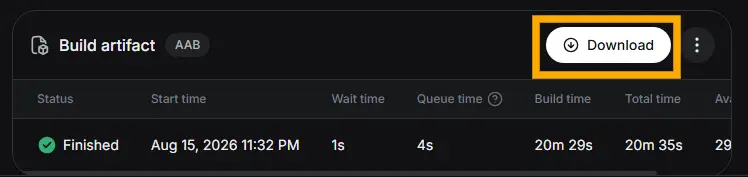
ダウンロードしたAABファイルをGoogle Playにアップロードする。内部テストを通したい場合は、テスト→内部テストから新しいリリースを作成し、先ほどダウンロードした.aabファイルをアップロードする。このとき、Play Console上で対象APIレベルが36になっていれば、今回の目的であるAndroid 16対応ができていることになる。
製品版としてリリースする場合は、テストではなく製品版から新しいリリースを作成し、今回ビルドした.aabを追加する。内部テストをしていた場合は内部テストで使ったものと同じAABファイルを使って問題ない。アプリバージョン・リリース名・リリースノートを確認し、エラーがなければ公開できる。
公開後はアカウントによっては最大1週間程度のGoogle審査が入る。今回は数分程度の審査が入り、その後公開された。Play Console上のステータスが製品版として「公開済み」となれば、問題なく公開されている。
以上で、Expoで作成したアプリをAndroid 16へ対応させる対応は完了した。
EASのAndroid Production Buildは通常
.aabで作られる。これはGoogle Playへの提出用である。 ↩︎